In development
Moova Academy
Train call-takers before they take real calls
A training platform where your call-takers practise on a sandbox dispatch console before they handle real bookings.

DriverZone by Moova Available now Integrates with iCabbi
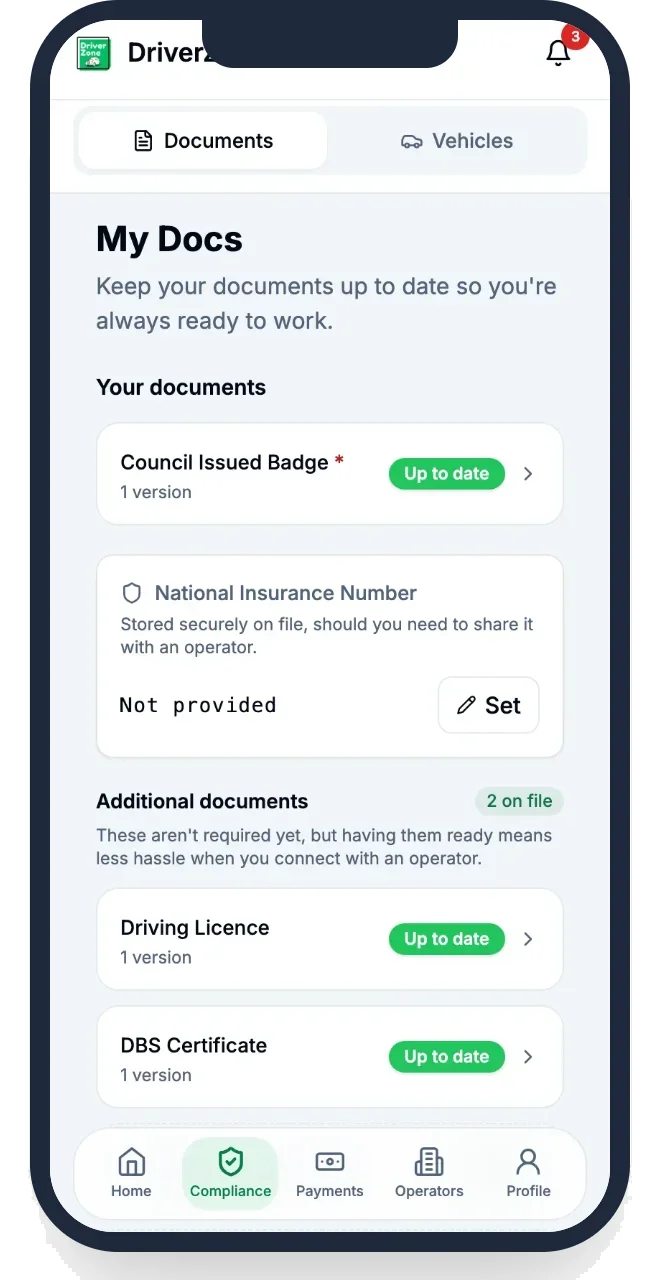
DriverZone gives taxi drivers one home for their paperwork and gives operators one place to recruit, onboard and keep them. Drivers join with an invite code and share the documents you need, and once they’re working, DriverZone shows you who is slipping away while there’s still time to act.
Why it matters
Recruiting and onboarding drivers takes up a lot of an operator’s time. Leads arrive from ads and website forms and end up spread across spreadsheets. Documents have to be chased one by one and checked by hand, and once a driver is on the books someone has to watch every badge, licence, MOT and insurance expiry and key the new dates into the dispatch system. Many recruits sign up and then stall, and nobody sees it happen. DriverZone puts it all in one place: the recruit, their documents, the checks and the link to your dispatch system.
What it does
Every hub has its own code, sign-up page and embeddable join form, and each sign-up records where the driver came from, so you can see which campaigns bring drivers in.
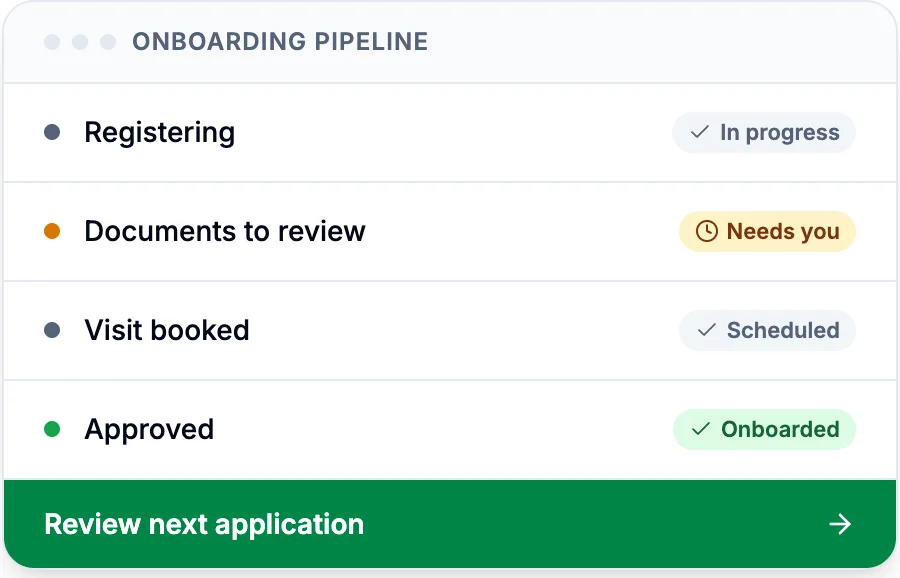
See every recruit from sign-up through documents, application, booking and onboarding. Recruits who stall don’t get lost, and your team can send them a reminder from the pipeline.
Claim or assign applications, add notes, put one on hold and see its full timeline. Each hub can set its own document rules for who can apply.
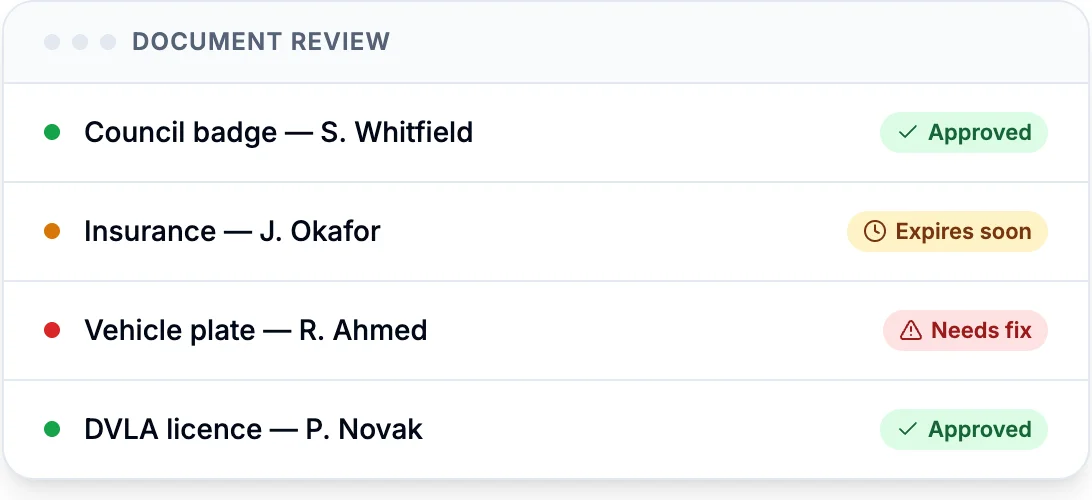
Approve or reject the documents a driver shares with you. The driver is told when something needs fixing and prompted to send the replacement.
Set slot times and capacity for each hub. Drivers book themselves in or staff book for them, reminders go out automatically, and no-shows can be offered a rebooking.
Record a check of the original document or a gov.uk share-code check, and choose which team members can sign it off. DriverZone flags right-to-work gaps and expiries.
Drivers are reminded before their documents expire, with DVSA MOT data pulled in for their vehicles. Operators are reminded about their own licences and fleet documents too.
Import your driver roster from iCabbi, match it to DriverZone accounts and create new drivers in iCabbi at onboarding. Approved document expiries are written back to iCabbi.
Manage your own cars and fleet insurance for drivers without a car of their own, invite team members with set roles, and get a daily recruitment briefing and weekly summary by email.
Driver retention
Drivers rarely resign. They log in less, turn down more work and drift to another operator, and by the time anyone notices, the car is off the road. DriverZone’s retention tools give your driver managers an early, clear picture of who is slipping, and a simple way to act on it every day.
Each night every driver is placed in a stage, from New and Active to At risk, Churning and Churned, using completed trips from your dispatch system.
A 0 to 100 score compares each driver’s activity, acceptance, earnings and quiet days with their own recent pattern, so part-timers are judged fairly and drivers who log in but take little work are flagged.
Driver managers get a morning briefing in Telegram listing who needs attention, with links to each driver’s profile, and log every call and outcome against the task.
Step-by-step sequences triggered by a driver’s stage, such as a WhatsApp message, then a text, then a call task, with branches for drivers who reply. Messages can wait for approval or send on their own, within contact limits and opt-outs.
WhatsApp replies land in a shared inbox linked to each driver’s record, where managers can reply, assign the conversation or turn it into a follow-up task.
When a driver returns to work, you see whether a manager’s contact or a playbook reached them first, and compare retention, joiners and leavers across every hub.
How it works
Each hub gets its own invite code and sign-up page. Share the link in ads and on social media, or put the join form on your own website.
Drivers create a free account, add their licence, badge, vehicle, MOT and insurance, and choose which documents to share with you, seeing exactly what your hub needs before they apply.
Your team approves or rejects each document, records the right-to-work check and books the driver into an onboarding appointment, with reminders sent before their slot.
At the appointment, staff create the driver’s iCabbi account straight from DriverZone. When you approve a renewed document later, its new expiry date is sent to iCabbi.
FAQ
Yes. DriverZone works alongside your dispatch system and connects to iCabbi today, to import your roster, create new drivers, keep document expiries up to date and, for retention, read completed trips each night.
No. DriverZone is free for drivers. They keep their papers in one app and can use them with every operator they work with.
The driver does. They pick which documents and vehicles go to which operator, and a document is only accepted onto your record once your team approves it.
Each hub has an invite code with its own sign-up page, and you can embed a join form on your own website. Drivers can also share their own referral link with people who want to drive for you.
Yes. Switch on onboarding appointments for each hub, with your own days, times and capacity. At the appointment, staff check the original documents, record right to work and create the driver’s iCabbi account.
Import your roster from iCabbi or by CSV, then invite those drivers to DriverZone in bulk. An adoption view shows each hub’s progress and which drivers still need a call.
Each driver has a contact limit and a cooling-off gap between automated messages. Drivers who opt out are never messaged, and each playbook can wait for a manager’s approval before anything is sent.
Each morning they get a Telegram briefing with the drivers to contact, work through their task list and inbox, and log the outcome after each call or message, so everyone can see who has already been spoken to.
Next step
Book a demo and we will walk you through it with your own operation in mind.
Works well with
Train call-takers before they take real calls
A training platform where your call-takers practise on a sandbox dispatch console before they handle real bookings.
Branded booking kiosks for every venue
White-label digital booking points for hotel lobbies, train stations and airports, so passengers book your taxis there.
Win passengers and recruit drivers
Campaigns that win passengers and recruit drivers, from digital marketing to leaflet drops in your area.
An extra team for your office
Our contact centre in Bacău, Romania takes on calls, admin, school-run coordination and contact management for taxi and private hire operators.